Why AI-generated prototypes break down in production
AI can generate a convincing app UI quickly, but prototypes often ship with the same hidden liabilities: duplicated styling, one-off components, inconsistent spacing rules, and UI logic embedded directly in pages. The result is an interface that looks “done” but becomes hard to change the moment the team needs a second feature, a new role, or a refreshed brand style.
The AI-to-no-code handoff pattern solves that gap. The goal is not to redesign the interface or rewrite it from scratch. It’s to turn what AI generated into a maintainable component library while keeping the UI intact—so future changes happen in a few components, not across dozens of screens.
The handoff principle: preserve pixels, change structure
The pattern is simple: keep the visual output stable while you refactor the underlying building blocks. Think of it as “componentizing in place.” You do this by extracting repeated UI into reusable components, centralizing style decisions into tokens, and moving data and workflow logic into predictable bindings—without changing the surface of the app.
This is where a visual development platform can help because it lets you reorganize structure safely. In WeWeb, for example, you can generate a first draft with AI and then do the systematic cleanup in a no-code editor—keeping the same screens while you standardize the parts. If you later need full code ownership, you can export a standard Vue.js single-page application rather than being stuck in a proprietary runtime, which makes long-term maintenance more realistic for teams that eventually “graduate” beyond pure no-code.
Step 1: Freeze the prototype with a baseline you can compare against
Before you extract anything, take a baseline snapshot of the prototype:
- List the key screens and flows (auth, CRUD, settings, onboarding, etc.).
- Capture the main breakpoints (desktop/tablet/mobile) if responsiveness matters.
- Note the UI behaviors that must not change (hover states, loading skeletons, empty states).
This baseline is your “pixel contract.” Every refactor that follows should be validated against it. The outcome is confidence: you can improve maintainability without accidentally altering the user experience.
Step 2: Identify the repeated UI you can extract first
AI prototypes usually repeat the same patterns with small variations. Start by scanning the app for the highest-leverage extractions:
- Layout primitives: page wrappers, headers, sidebars, containers, section blocks.
- Typography blocks: page titles, section titles, helper text, empty-state copy.
- Action patterns: primary/secondary buttons, icon buttons, confirmation modals.
- Data patterns: tables, list rows, cards, filters, pagination.
- Feedback patterns: toasts, inline validation, loading states, error banners.
The key is to extract what repeats as-is, even if it’s imperfect. You can improve design later. First, eliminate duplication. If you’re running this work as a group session, the calmest approach is to assign one person to refactor and keep everyone else in “observer mode” to reduce thrash; this style is outlined well in an observer mode mob session playbook.
Step 3: Convert “styles” into design tokens without redesigning
Most prototype debt is really styling debt: hard-coded colors, inconsistent spacing, and ad hoc shadows. To fix it without changing the UI, you don’t redesign—you name the decisions that already exist.
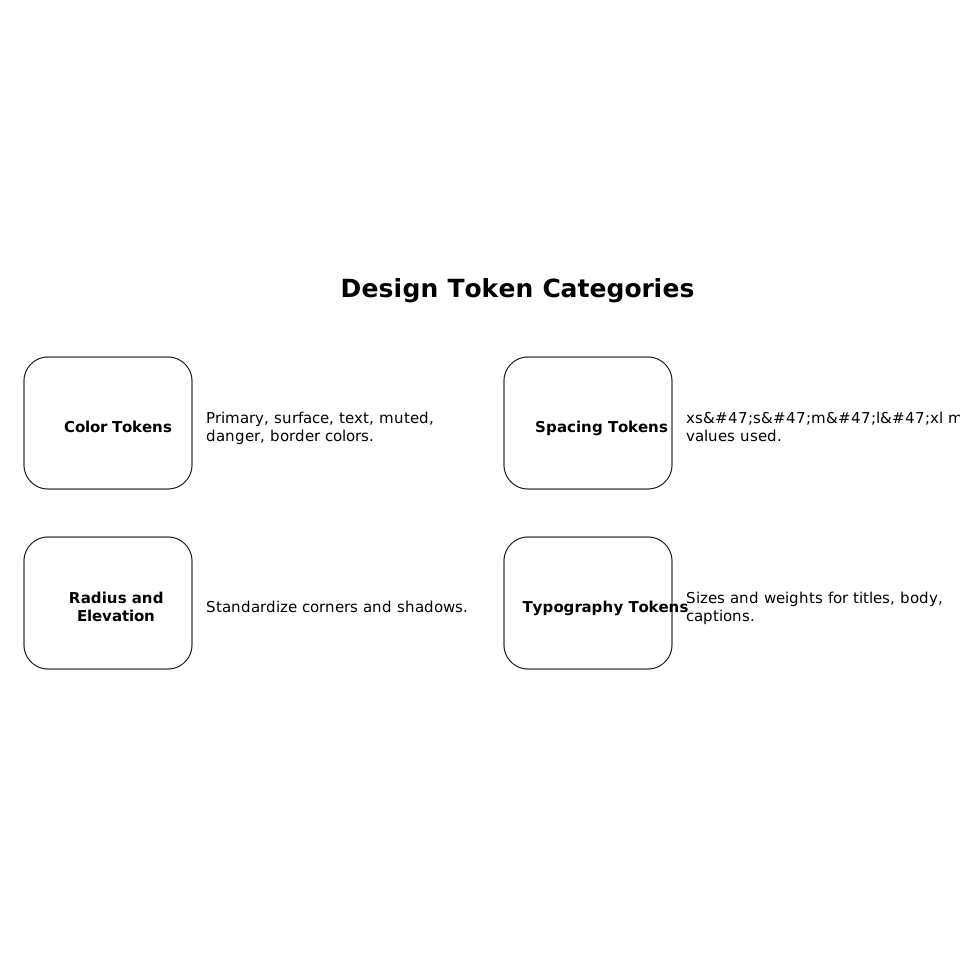
Create a small token set that reflects what the UI is already doing:
- Color tokens: primary, surface, text, muted, danger, border.
- Spacing tokens: xs/s/m/l/xl mapped to actual pixel values used.
- Radius and elevation: standardize corners and shadows.
- Typography tokens: sizes and weights for titles, body, captions.
Then replace hard-coded values gradually. The visual should remain the same—only the source of truth changes. This is what makes future rebrands or accessibility improvements feasible: you update tokens rather than hunt through every page.
Step 4: Separate UI components from workflow and data bindings
AI-generated screens often mix concerns: UI structure, data fetching, transformation, and conditional logic all live together. The handoff pattern moves toward a clean separation:
- Components are responsible for layout and display.
- Pages orchestrate data queries, permissions, and routing.
- Reusable logic (filters, mapping, validation rules) becomes shared utilities or consistent bindings.
In no-code environments, this often means centralizing queries and standardizing how components receive props (inputs) and emit events (outputs). For example, a “UserCard” component shouldn’t fetch a user; it should accept a user object and render it. That single shift reduces hidden coupling and makes it easier to reuse components in new flows.
Step 5: Introduce a component contract and versioning habits
A component library becomes maintainable when it has contracts. Define them lightly—enough to prevent future chaos:
- Naming: consistent component names (e.g.,
AppButton,AppModal,DataTable). - Props rules: inputs are explicit; avoid relying on global state implicitly.
- Variants: a small variant system replaces one-off duplicates (size, intent, density).
- Deprecation: if you replace a component, keep the old one until all usages are migrated.
If you’re using WeWeb as the editing surface, the objective is to keep the library coherent as the app evolves, while still allowing teams to bring in custom code components when necessary. That “extend when needed” model is what makes the handoff sustainable: the no-code editor stays productive for most changes, but you’re not blocked when requirements get specific.
Step 6: Add validation and defaults where the prototype is fragile
Prototypes typically under-specify edge cases: empty lists, bad inputs, missing permissions, partial records, and secret-dependent configuration. As you convert screens into reusable components, reinforce them with runtime validation and safe defaults. This is especially important for internal tools and form-heavy apps where a single inconsistent field can break multiple flows.
A practical approach is to define schemas for form payloads and normalize defaults (including secret-aware defaults) so environments behave predictably. If your app includes many dynamic forms, the ideas in schema-driven internal tool forms can help you avoid “it worked on my page” drift.
Step 7: Keep ownership and deployment flexibility in mind
A maintainable component library isn’t only a design system—it’s an ownership strategy. As your app grows, you’ll likely want predictable performance, clear audit boundaries, and cost control. Platforms that charge per end user can make experimentation expensive, while closed ecosystems can limit long-term governance.
WeWeb positions itself around building production-grade applications with the option to launch quickly on a global AWS CDN or export a standard Vue.js SPA for self-hosting. That matters during the handoff phase because the “prototype to maintainable system” journey often ends with stricter CI/CD, deeper code review, and broader team ownership. Using weweb.io as the workspace for both generation and refactoring helps keep that journey continuous rather than a forced rebuild.
What success looks like after the handoff
When the pattern is working, changes become boring in the best way:
- A new page reuses existing layout, typography, and data components.
- A brand tweak happens in tokens, not across dozens of screens.
- Bug fixes land in one component and propagate everywhere.
- New teammates can find “the button” or “the modal” without archaeology.
You still have the same UI the AI generated—just with a structure that can survive real product iteration.